Quick Intro
The next building block of our DC network will be the Intra-VNI service, aka L2VNI.
L2VNI (Layer 2 Virtual Network Identifier) represents a VXLAN segment dedicated to extending Layer 2 domains (such as VLANs) across the fabric over the IP underlay network. It ensures that devices within the same VLAN, even if they are on different leaf switches, can communicate as if they were on the same local Layer 2 network.
The configuration itself is relatively simple, however in our case we’re still missing some important prerequisites to enable dataplane functions in our fabric.
feature fabric forwarding
enables the switch to perform VXLAN encapsulation and decapsulation, which is crucial for forwarding traffic across the VXLAN overlay network. This command activates the fabric forwarding infrastructure, allowing the device to participate in VXLAN operations such as handling L2VNIs and L3VNIs for seamless communication across the fabric.feature interface-vlan
required in Cisco Nexus EVPN VXLAN fabric to enable the creation and configuration of SVI (Switch Virtual Interfaces), which are essential for routing traffic between VLANs and supporting L3VNI operations.fabric forwarding anycast-gateway-mac <mac addr>
globally shared MAC address used for the anycast gateway, enabling seamless host mobility and optimized Layer 3 routing by ensuring consistent gateway MAC address resolution across the fabric.feature vn-segment-vlan-based
enables the mapping of VLANs to VNIs, allowing VLAN-based segmentation to be extended across the VXLAN overlay network.
So by the end of this part of the configuration we’ll have the following features along with the shared mac-address configured on our leaf switches:
dc01-r01-leaf01# show run | sec feature|fabric
feature ospf
feature bgp
feature fabric forwarding
feature interface-vlan
feature vn-segment-vlan-based
feature lacp
feature vpc
feature nv overlay
fabric forwarding anycast-gateway-mac aaaa.bbbb.cccc
L2VNI configuration
I’ve connected a few different endpoints to leaf switches in the topology, one endpoint represents multi-homed server which will run mLAG (LACP) between it and the pair of leaf switches in the first rack, and single-homed device connected to first switch in the second rack.
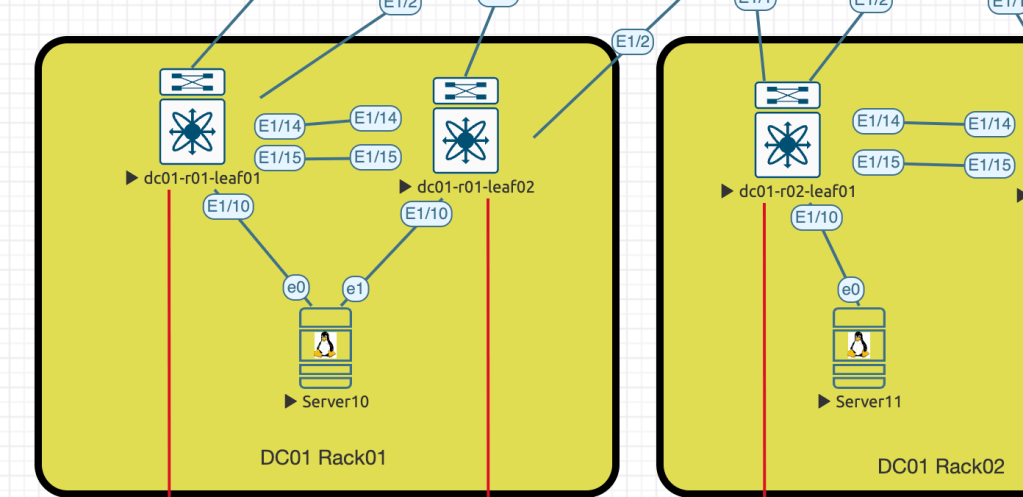
VLAN 100 will be used to enable the communication between these hosts. Hosts are regular Ubuntu server VMs.
The configuration starts with VLAN creation and assignment of this VLAN to the VNI-segment.
dc01-r01-leaf01# show run vlan 100

vlan 100
vlan 100
  name server-domain100
  vn-segment 900100
After that we need to configure EVPN instance for the added VLAN
evpn
  vni 900100 l2
    rd auto
    route-target import auto
    route-target export auto
In the last section we need to define the replication method for the BUM traffic, in my case I use Ingress-Replication
interface nve1
  member vni 900100
    ingress-replication protocol bgp
Server-facing ports configured as an access ports in VLAN10, the only difference is Server10 is connected to the port-channels, while Server11 is orphan.
- Server10: 10.10.100.10/24
- Server11: 10.10.100.11/24
Verification
End port related mac-address tables:
dc01-r01-leaf01# show mac address-table interface po10
Legend:
* - primary entry, G - Gateway MAC, (R) - Routed MAC, O - Overlay MAC
age - seconds since last seen,+ - primary entry using vPC Peer-Link,
(T) - True, (F) - False, C - ControlPlane MAC, ~ - vsan
   VLAN     MAC Address      Type      age     Secure NTFY Ports
---------+-----------------+--------+---------+------+----+------------------
*  100     7ed8.f7ad.d433   dynamic  0         F      F    Po10
dc01-r01-leaf01#
dc01-r02-leaf01# show mac address-table interface ethernet 1/10
Legend:
* - primary entry, G - Gateway MAC, (R) - Routed MAC, O - Overlay MAC
age - seconds since last seen,+ - primary entry using vPC Peer-Link,
(T) - True, (F) - False, C - ControlPlane MAC, ~ - vsan
VLAN MAC Address Type age Secure NTFY Ports
---------+-----------------+--------+---------+------+----+------------------
* 100 5001.0010.0000 dynamic 0 F F Eth1/10
dc01-r02-leaf01# VLAN related mac-address table:
dc01-r01-leaf01# show mac address-table dynamic vlan 100
Legend:
* - primary entry, G - Gateway MAC, (R) - Routed MAC, O - Overlay MAC
age - seconds since last seen,+ - primary entry using vPC Peer-Link,
(T) - True, (F) - False, C - ControlPlane MAC, ~ - vsan
   VLAN     MAC Address      Type      age     Secure NTFY Ports
---------+-----------------+--------+---------+------+----+------------------
C  100     5001.0010.0000   dynamic  0         F      F    nve1(10.255.255.102)
*  100     7ed8.f7ad.d433   dynamic  0         F      F    Po10
VNI state:
dc01-r01-leaf01# show nve vni 900100 detail
VNI: 900100
  NVE-Interface       : nve1
  Mcast-Addr          : UnicastBGP
  VNI State           : Up
  Mode                : control-plane
  VNI Type            : L2 [100]
  VNI Flags           :
  Provision State     : vni-add-complete
  Vlan-BD             : 100
  SVI State           : n/a
Local L2RIB state:
dc01-r01-leaf01# show l2route evpn mac evi 100

Flags -(Rmac):Router MAC (Stt):Static (L):Local (R):Remote (V):vPC link
(Dup):Duplicate (Spl):Split (Rcv):Recv (AD):Auto-Delete (D):Del Pending
(S):Stale (C):Clear, (Ps):Peer Sync (O):Re-Originated (Nho):NH-Override
(Pf):Permanently-Frozen, (Orp): Orphan

Topology    Mac Address    Prod   Flags         Seq No     Next-Hops

----------- -------------- ------ ------------- ---------- ---------------------
------------------
100         5001.0010.0000 BGP    Rcv           0          10.255.255.102

100         7ed8.f7ad.d433 Local  L,            0          Po10
Check the BGP table for remote MAC:
dc01-r01-leaf01# show bgp l2vpn evpn | i 5001.0010.0000|Route|10.255.255.102
BGP table version is 22, Local Router ID is 10.255.255.3
Route Distinguisher: 10.255.255.3:32867    (L2VNI 900100)
*>i[2]:[0]:[0]:[48]:[5001.0010.0000]:[0]:[0.0.0.0]/216
                      10.255.255.102                    100          0 i
*>i[3]:[0]:[32]:[10.255.255.102]/88
                      10.255.255.102                    100          0 i
Route Distinguisher: 10.255.255.5:32867
* i[2]:[0]:[0]:[48]:[5001.0010.0000]:[0]:[0.0.0.0]/216
                      10.255.255.102                    100          0 i
*>i                   10.255.255.102                    100          0 i
*>i[3]:[0]:[32]:[10.255.255.102]/88
                      10.255.255.102                    100          0 i
* i                   10.255.255.102                    100          0 i
Reachability verification between the hosts:
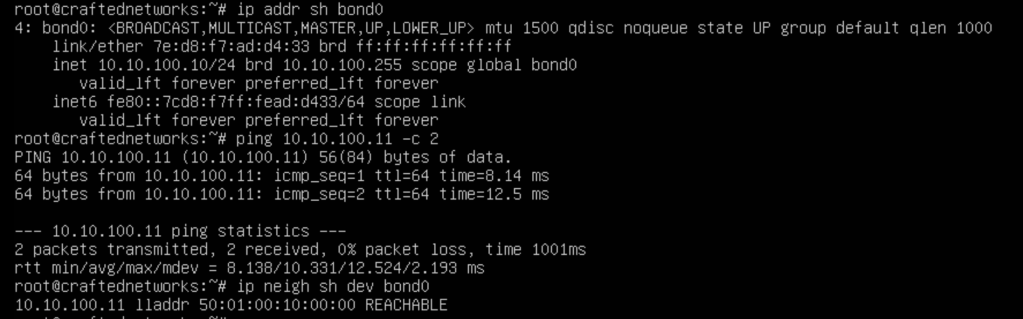
This will conclude L2VNI service configuration
 Yet another Blog
Leave a comment